
Wing It: Cloud CRUD with Winglang
I spend a lot of time in Terraform and CDK, but I kept wishing for a tighter feedback loop when I’m experimenting. Winglang scratches that itch with a local simulator that lets me poke at APIs, tables, and queues before I ever touch AWS. Below is a small CRUD API I built while learning Wing; it starts local, then ships to AWS with a simple GitOps flow.
Prereqs: Docker, Node.js, Terraform, AWS account
Why Wing caught my eye
Wing splits code into two halves:
- Preflight: runs at compile time to define static infra (tables, buckets, etc.).
- Inflight: runs at runtime to handle requests and events.
That split matters because the simulator lets me exercise both parts locally – no guessing if my API writes actually reach DynamoDB.
Building the CRUD API
Install Wing first:
npm install -g winglang
Then “bring” the modules you need:
bring cloud;    // cloud resources
bring dynamodb; // database
bring http;     // local HTTP testing
bring expect;   // assertions
I’m persisting messages in DynamoDB:
let messagesTable = new dynamodb.Table(
  attributes: [
    { name: "id", type: "S" }
  ],
  hashKey: "id"
);
That’s preflight code—Wing sets up the table during compile time.
Create the API and a simple counter (also preflight):
let api = new cloud.Api();
let messageCounter = new cloud.Counter();
Now the inflight part that actually handles the POST:
api.post("/messages", inflight (request) => {
  let newMessage = Json{
    id: messageCounter.inc(),
    message: request.body
  };
  log("New message: {Json.stringify(newMessage)}");

  let recordId = messageCounter.inc();
  messagesTable.put(
    Item: {
      id: Json.stringify(recordId),
      message: newMessage
    }
  );
  return {
    status: 200,
    headers: {
      "Content-Type" => "text/html",
      "Access-Control-Allow-Origin" => "*",
    },
    body: Json.stringify(newMessage),
  };
});
Quick sanity tests before deploying:
let validateResponse = inflight(response: http.Response, expectedContent: str) => {
  log("Response status: {response.status}");
  expect.equal(response.status, 200);
  assert(response.body?.contains(expectedContent) == true);
};

test "messages API returns correct response" {
  let response = http.post("{api.url}/messages", {
    body: "xyz",
  });
  log("Response body: {response.body}");
  assert(response.body?.contains("xyz") == true);
}
Fire up the local simulator (Docker running):
wing it
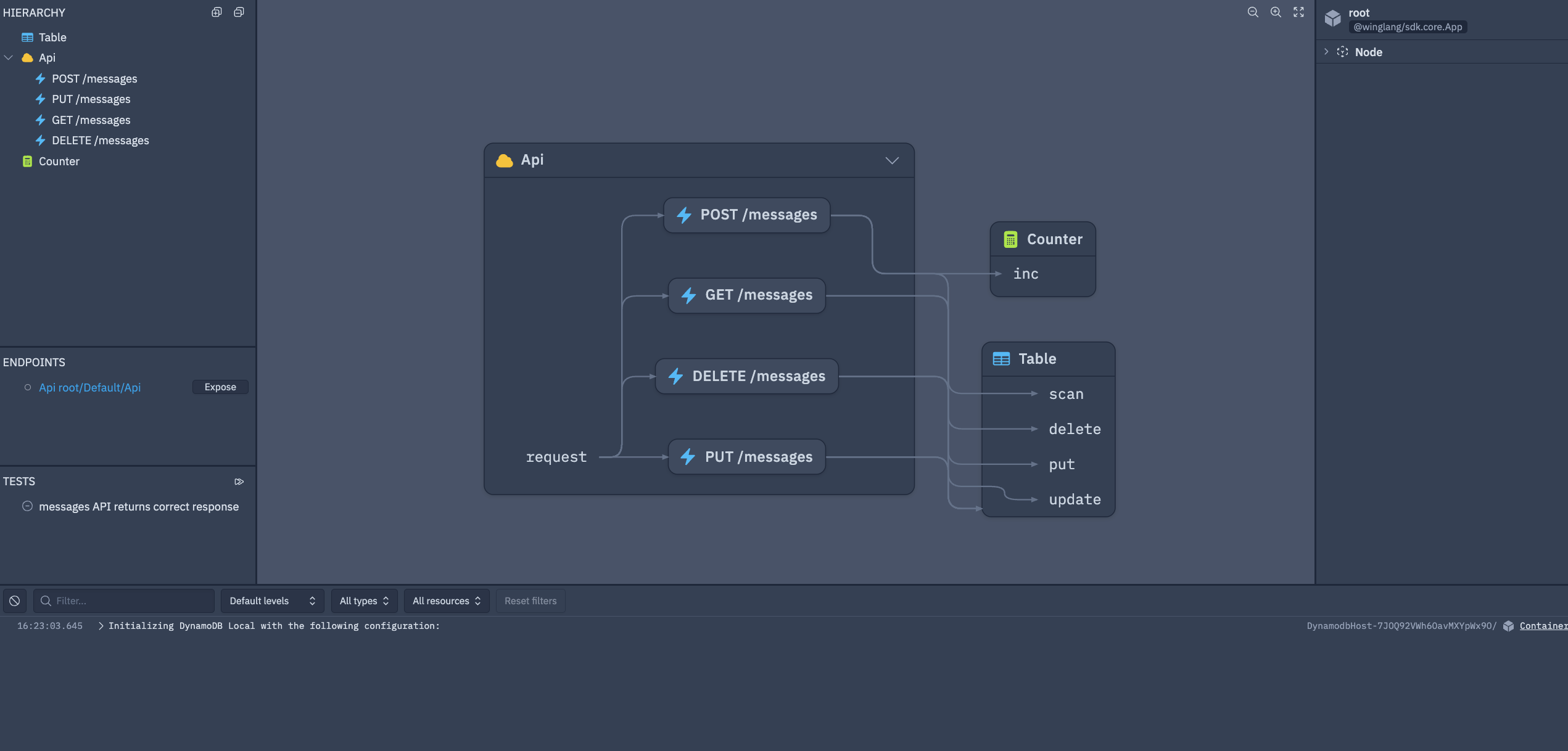
You’ll get a UI where you can hit the API, inspect logs, and peek at DynamoDB. Screenshot for reference:
Shipping to AWS
Compile to Terraform (you can target CDK too):
wing compile -t tf-aws main.w
The Terraform output lands in target/main.tfaws. From there, the usual:
terraform init
terraform apply
GitOps setup
To keep state in S3/DynamoDB instead of local files, drop this JavaScript file in the project root:
exports.Platform = class TFBackend {
  postSynth(config) {
    config.terraform.backend = {
      s3: {
        bucket: process.env.TF_BACKEND_BUCKET,
        region: process.env.TF_BACKEND_REGION,
        key: "state/terraform.tfstate",
        dynamodb_table: process.env.TF_BACKEND_TABLE
      }
    };
    return config;
  }
};
The helper script.sh in the repo sets up the S3 bucket and DynamoDB table for the backend. I also wired a GitHub Action to run Wing and Terraform – here’s the workflow.
Secrets/vars to add in GitHub:
AWS_ACCESS_KEY_IDAWS_REGIONAWS_SECRET_ACCESS_KEYTF_BACKEND_BUCKETTF_BACKEND_TABLE
I used a temporary IAM user for simplicity; long term, use GitHub OIDC.
Closing thoughts
Wing’s simulator shortens the loop from “idea” to “validated API” in a way Terraform/CDK alone don’t. If you try this flow and hit snags – or find better patterns – let me know.