
Kiro Crew launched on August 4, 2026, and I immediately wanted to know one thing: can I give it a real infrastructure task, disconnect, and trust it to do useful work? The short answer is yes — with caveats. Here’s what happened when I handed off a Terraform drift detection job to a Crew agent and went offline for a few hours.
What Kiro Crew Is (and Isn’t)
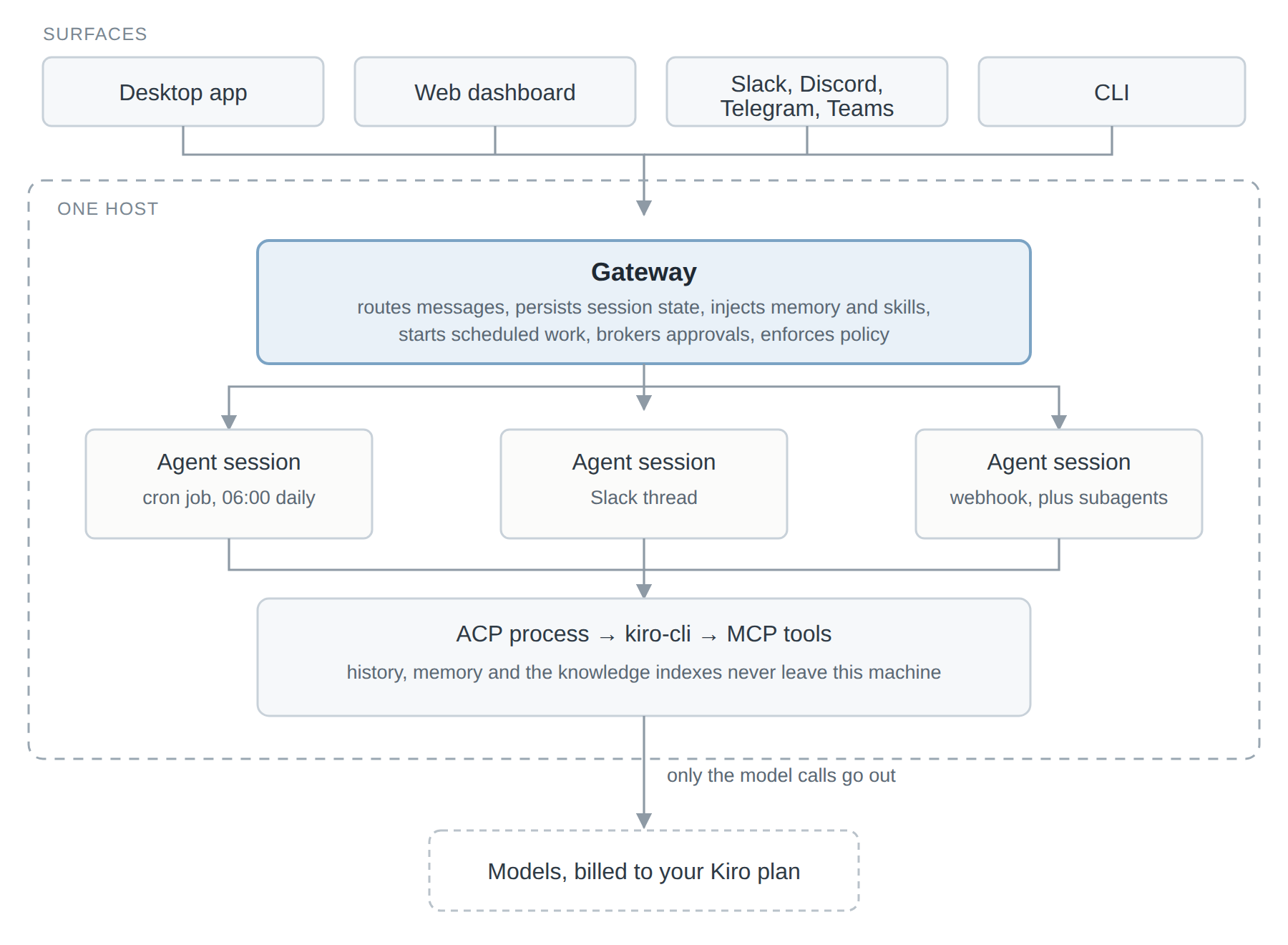
If you’ve used Kiro’s autonomous mode in the IDE, Crew will feel familiar — but don’t mistake them for the same thing. Kiro’s autonomous mode handles a single task within a session. Crew keeps agents running 24/7, maintains memory across sessions, and can execute on a schedule without you being in the editor. Agents report back via Slack, Telegram, or Discord, so you’re not watching a terminal.
Crew also reads your existing .kiro steering files directly. This is important: any conventions you’ve already encoded — preferred CDK patterns, naming standards, OIDC over IAM users — carry forward automatically. You’re not starting from scratch.
The Task I Gave It
I have a small AWS setup: a few CDK stacks, a handful of Lambda functions, and an S3-backed static site. My Terraform state occasionally drifts from live resources — usually because I’ve poked at something manually in the console during debugging. This is a boring but critical hygiene task I almost never make time for.
My steering file already contained this:
# .kiro/steering/infra.md
Always prefer OIDC-based authentication over long-lived IAM credentials.
IAM policies should follow least privilege. Flag any * resource ARNs.
Terraform state is stored in S3 with DynamoDB locking.
I then set up a Crew agent with this task:
Run terraform plan across all stacks in this repo.
Flag any drift between state and live AWS resources.
For any drifted resource, produce a short summary: what changed, likely cause, and whether it's safe to auto-remediate.
Post a summary to Slack when done.
I closed the laptop.
What It Produced
About 40 minutes later, a Slack message appeared with a structured report. Three resources had drifted:
- An S3 bucket policy had an extra statement added manually (flagged as safe to remediate)
- A Lambda environment variable was different from state (flagged as safe)
- A security group had a new inbound rule I didn’t recognize (flagged as not safe to auto-remediate — it asked me to review manually)
That last one was exactly right. I had added a temporary debug rule a week ago and forgotten to remove it. Without Crew flagging it, it would have sat there indefinitely.
The summaries were readable — short, plain English, with the resource ARN and the specific attribute that differed. It respected the least privilege note from the steering file and specifically called out the * resource ARN on the security group rule.
Where It Needed Steering
Crew’s first attempt ran terraform plan on all stacks sequentially, which took longer than necessary. I updated the steering file to parallelize across stacks and re-ran — that cut the runtime roughly in half. This is a pattern I also noticed with Winglang: the tool does what you tell it, and if you’re vague, it picks a reasonable default that isn’t always optimal.
I also had to be explicit about what “drift” meant. Initially it flagged every tags difference as drift, which was too noisy. Adding a line to the steering file — Ignore tag-only differences unless the tag key starts with 'env' or 'owner' — immediately cleaned that up.
The Memory Angle
After the first run, I didn’t have to re-explain the ignore rule. Crew retained it. On the next scheduled run the following morning, tag-only differences were silently excluded from the report. This is where persistent memory earns its keep: you’re gradually shaping an agent’s behavior the same way you’d onboard a junior engineer — not in one session, but over time.
When Crew Makes Sense vs. When It Doesn’t
Crew is well-suited to tasks that are:
- Repetitive and boring — drift checks, tag compliance scans, changelog generation
- Async-safe — you don’t need the result immediately
- Well-defined but tedious to script — things you could write a bash script for, but never do because it would take two hours
It’s less suited to tasks requiring deep contextual judgment, production deployments, or anything where a mistake is hard to reverse. I wouldn’t point Crew at terraform apply without a human approval gate. The drift detection workflow is safe because it’s read-only — the remediation step is explicitly opt-in.
Credit cost is also real. Longer agent runs with large codebases will burn through tokens quickly. For my small setup, it was well within the free tier during the preview period — but plan accordingly for larger repos.
Closing Thoughts
Crew fills a gap that pure IaC tooling doesn’t cover well: the operational hygiene layer that everyone knows matters but rarely gets prioritized. It doesn’t replace Terraform or CDK — it sits on top of them and does the work you keep deprioritizing.
If you’ve already adopted Kiro for spec-driven development, Crew is a natural next step. Your steering files are ready, your conventions are encoded, and the jump to async autonomous agents is smaller than it looks.
If you try this or find better patterns for the drift detection setup — let me know.
Share on
X Facebook LinkedIn BlueskyYou May Also Enjoy
A First Look at Kiro Crew
Amazon open sourced Kiro Crew a few weeks ago, and I spent some evenings going through the repo and the docs to work out what it actually does. Most of the c...
Wing It: Cloud CRUD with Winglang
I spend a lot of time in Terraform and CDK, but I kept wishing for a tighter feedback loop when I’m experimenting. Winglang scratches that itch with a local ...
Democratizing infrastructure as code with CDKTF and Terraform
We all know that infrastructure as code (IaC) is a widely adopted pattern to provision and manage infrastructure. Some good examples are Terraform, AWS Cloud...
Solving the Cold Start Challenge for Lambda Function Using Terraform Cloud
In this post we are going to properly address the cold starts for Lambda Functions. In a later post we will create a private module which facilitates consump...