
A First Look at Kiro Crew
Amazon open sourced Kiro Crew a few weeks ago, and I spent some evenings going through the repo and the docs to work out what it actually does. Most of the coverage I have read presents it as the next step after the IDE, which made me expect a smarter agent. It is not that. The model behind it is the same model the Kiro IDE talks to. What changes is when it runs, what it remembers from one run to the next, and how many of them run at the same time. So what you are really getting is a scheduler with a memory attached to it, and I think that is a more useful way to look at it.
As opposed to previous posts, this one is not a tutorial. I have not used Crew on a real project yet, so this is what I could verify from the documentation and the source, plus one hands-on writeup from somebody who did run it.
Kiro Crew is an orchestration layer that sits on top of the Kiro CLI. It is Apache 2.0, self hosted, written in Python, and it drives kiro-cli over ACP, the Agent Client Protocol that came out of Zed. It does not replace the IDE, the CLI or the web version, it runs them for you, repeatedly, while you are doing something else. It was built inside Amazon under the name MeshClaw and open sourced in August 2026. You need Python 3.10 or newer, Node.js 18 or newer, and a kiro-cli that is signed in. A Kiro account is mandatory. On macOS and Linux you get a desktop app, a one line installer and Docker. On Windows you can only install from source, there is no desktop build. The software itself is free, but the inference goes against your existing Kiro plan, and the hardware is yours.
The distinction the Kiro team makes is the one I found useful. The IDE, the CLI and the web version all handle tasks inside a single session while you are driving. Crew takes the same thing across sessions, without you driving. Everything else follows from that.
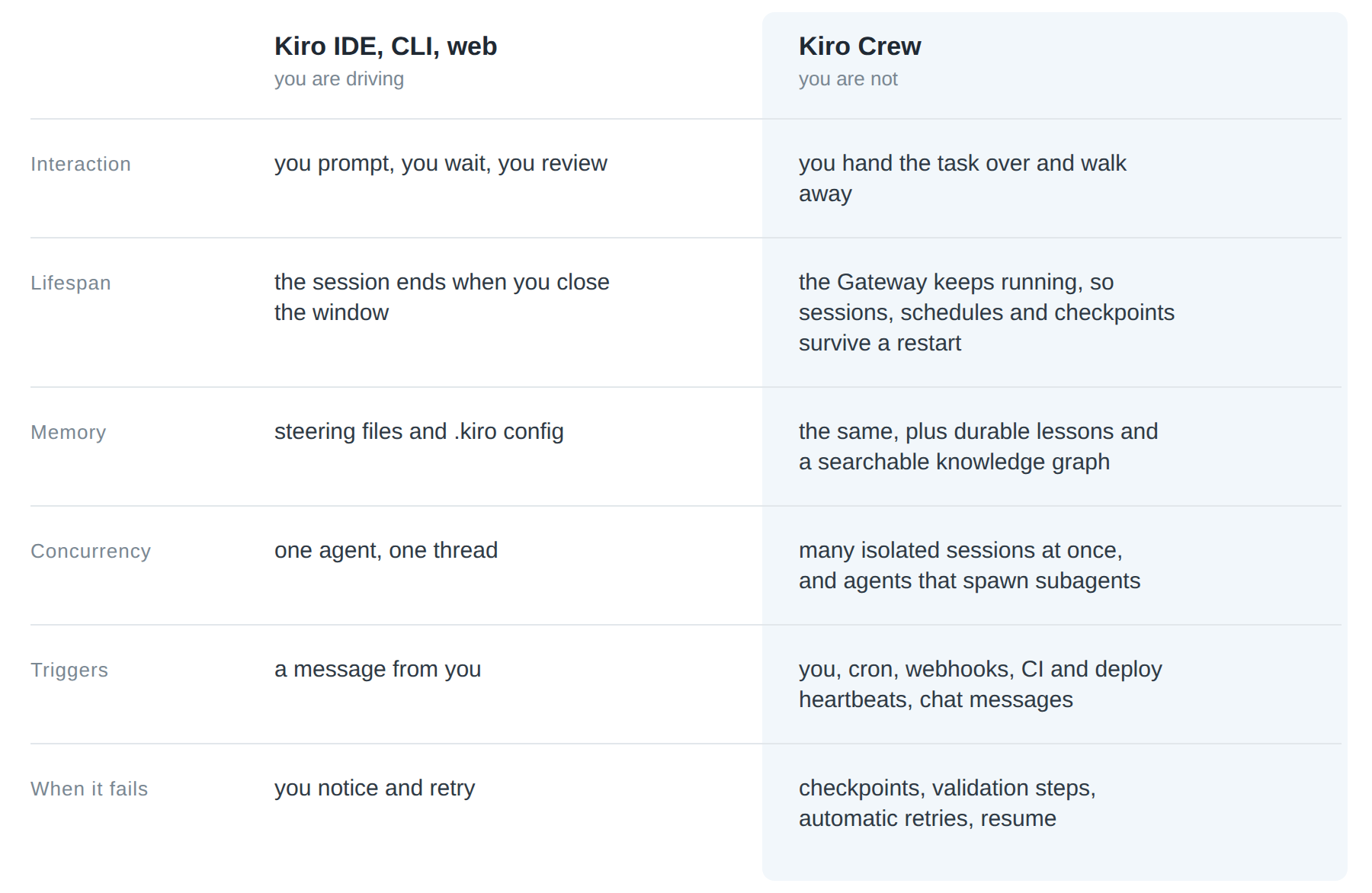
The part I like most is that Crew reads the same .kiro config. Your steering files, skills and custom agents carry over, so trying it out is not a rewrite of anything. And if the task in front of you is “write this function”, the IDE is still the right tool and Crew only adds overhead. It becomes interesting when the task is “watch this, triage that, do this every Monday morning”, because that is something the IDE cannot really do.
The architecture
The shape of it is simple enough to keep in your head. Everything hangs off one long running process called the Gateway. The Gateway routes messages, persists session state, injects memory and skills, starts the scheduled work, brokers approvals and enforces policy. Underneath it sit the agent sessions, and every dashboard conversation, Slack thread, cron job and subagent gets its own isolated one. Each session is backed either by a dedicated ACP process or by a handle on a shared multiplexed runtime. Please note that a session here is a logical isolation boundary, not necessarily one process on the operating system, which is a distinction that matters if you are reasoning about what an agent can reach.
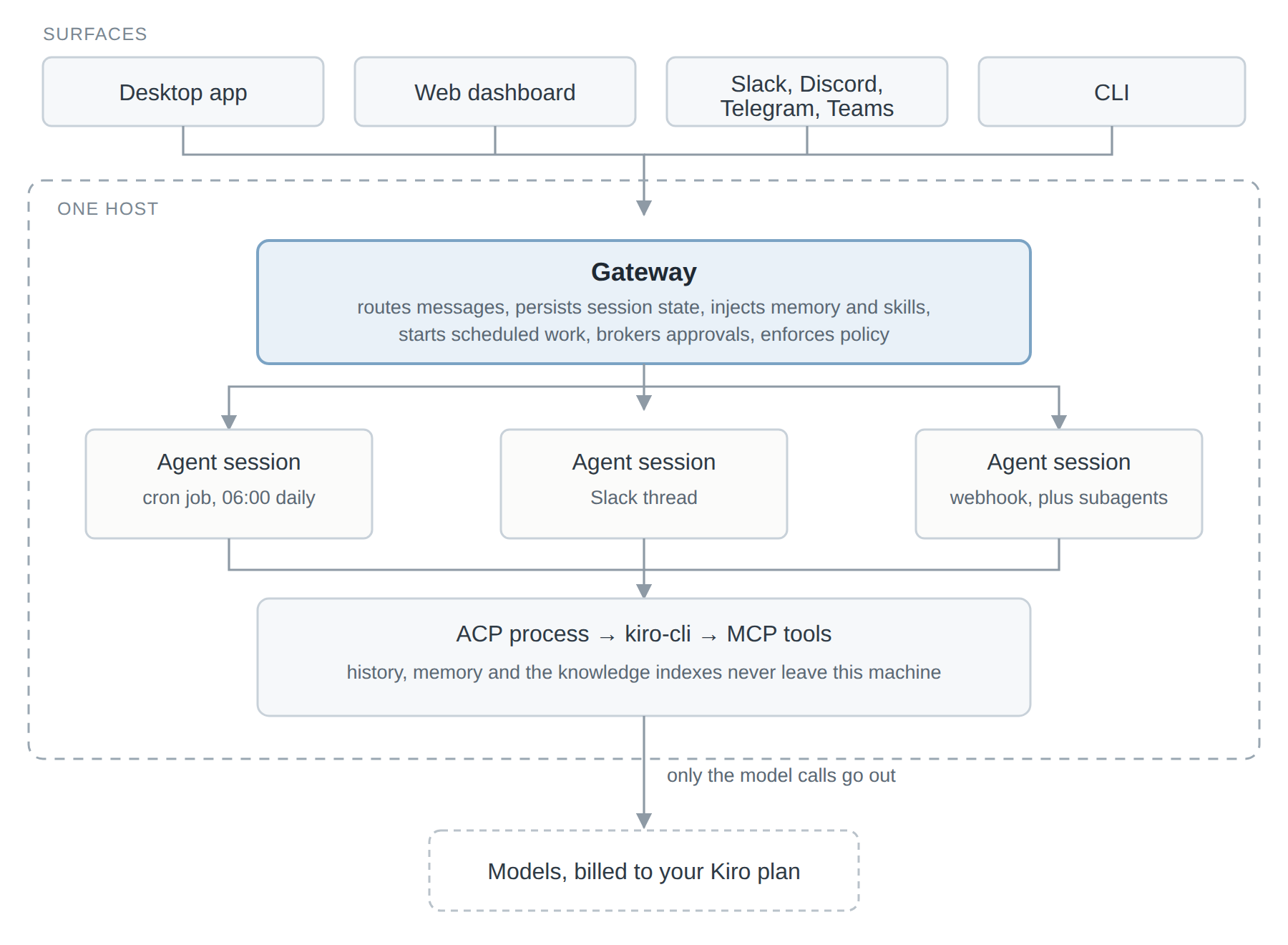
The whole thing runs on one machine. Gateway, sessions, ACP processes and all the state live on the same host, and the conversation history, the memory and the knowledge indexes never leave it. Only the model calls go out, through kiro-cli. For the semantic memory the embeddings also run in process, so the model downloads the first time you start it up and it falls back to keyword search until that is done. If you are in an airgapped environment you can point KIROCREW_EMBED_MODEL_URL at an internal mirror. The default port is 5476 and it binds to loopback, which I was glad to see, because the opposite default would have been a bad start.
Security
This is the part I looked at most closely, because something that runs while you are asleep is a different kind of risk than something you are sitting in front of. It is marketed as seven layers, although the diagram itself lists twelve controls, so take the number with a grain of salt. These are the ones I could actually verify:
- An OS level sandbox, Linux namespaces or macOS Seatbelt, with standard, strict and off modes. On Windows there is no OS level layer at all.
- Commands are denied by default, with 137 bundled patterns for destructive and exfiltration commands, plus blocking of suspicious bash patterns.
- Sensitive paths are blocked, some paths are write protected, and sensitive environment variables get stripped.
- MCP input validation, redaction of credentials in the output, and detection of exfiltration over URLs.
- Interactive tool approvals, in the dashboard, in Slack and in Telegram.
- A signed audit log, which you can inspect with
kirocrew security events,kirocrew security auditandkirocrew security verify. - A governance ceiling, where policy files compose tightest wins, so an app can narrow its own scope but it cannot loosen the enterprise ceiling.
That last one is the piece I would want in an enterprise setup, and it is usually the piece these frameworks skip. The repo makes the obvious point itself and it is the right one: none of this removes the need to protect your credentials and to review anything with real impact.
The telemetry is one anonymous daily heartbeat with five fields, a random instance UUID, the release version, the Python minor version, the install channel and a first run flag. It is off by default in CI and when KIROCREW_HOME is not the default, and you can turn it off in the dashboard, with kirocrew telemetry disable, or by setting KIROCREW_TELEMETRY_DISABLED=1. An admin can also pin it off through the security policy. What caught my attention is that the docs say the field list was cut down from nine, because a stable instance id made the coarse attributes identifying once you combined them. I have not often seen a project explain a re-identification problem in its own telemetry that openly.
Somebody who actually ran it
Sarvar Nadaf published a hands-on writeup on dev.to at the beginning of August, which is the most concrete third party account I could find. It is one person testing it and not a benchmark, so read it that way. He simulated a P1 latency alert on a payment service, 200ms going up to 4500ms, and the agent ran seven diagnostic steps in parallel and came back with an incident summary in 33 seconds, correlating git log, cron schedules and system resources. Its hypothesis was a connection pool misconfiguration after a pg-pool dependency bump. His own conclusion is the reasonable one, that this is a starting point for the on-call engineer and not a verdict.
The whole workflow, investigating and then creating two cron jobs and persisting four knowledge items, took him 4 minutes and 36 seconds. He estimated roughly 3000 to 5000 input tokens and 1500 to 2500 output tokens, so about 2 to 4 cents per investigation, and around 5 cents a day for a health check cron. Two things to keep in mind with those numbers though. He ran it in Trust approval mode, so with the guardrails relaxed, which matters quite a lot if you have just read the security section above. And the cost numbers need the paragraph below.
What would make me careful
The token consumption is the first thing. InfoQ reported Reddit users saying that Crew burns through tokens noticeably faster than the Kiro CLI does, and that does not sit well next to the four cents per incident figure. A single investigation you asked for and a scheduled system running in the background are two very different cost profiles, and background jobs bill against your plan whether you are watching them or not. I would want a spend alert configured before letting any cron job run unattended.
Then there is the lock-in question. It is Apache 2.0 and built on an open protocol, but at launch it needs a Kiro account and kiro-cli. The project says other people can add support for other ACP compatible runtimes, and so far nobody has. Windows is also clearly a second class citizen here. No desktop build and no OS sandbox is a real gap and not just a packaging detail, so if your team is mostly on Windows this is not for you yet.
The single host design cuts both ways as well. It is the reason the privacy story is as clean as it is, and it is also the reason there is no distributed execution, no HA, and one Gateway that is a single point of failure and a single blast radius at the same time. On top of that the project is early. It is version 0.1.x, and when I looked at the repo on 31 August 2026 it had 338 stars, 22 forks, 1427 commits, 132 open issues and 83 open PRs. Amazon talks about more than 39000 internal builders, around 500 contributors and about 143 commits a week in under six months, and I have no reason to doubt any of that, but those numbers describe what happened inside Amazon. The open source project is days old.
The one that stays with me is the autonomy itself. The dev.to author ends on the question of what makes you nervous about this, the autonomy, the blast radius, or the fact that it runs while you sleep, and he recommends deny listing tools and keeping a human in the loop for anything that remediates. I would go a bit further and not run remediation unattended at all, at least not before watching it for a while. The category is getting crowded too, with OpenClaw, Hermes and Codex all going after the same problem, and what Crew claims for itself is developer specific tooling, end to end inspectability and defence in depth, plus the claim that skills written for other open standard platforms run on it unmodified.
Who is this for
It makes sense if you have recurring toil that is mechanical, like dependency triage, CI failure triage or weekly reports, or if you have an on-call rotation and having the evidence collected before a human opens the laptop is worth something to you. Self hosting for compliance reasons is another good argument for it, and of course it helps if you are already paying for Kiro. It makes a lot less sense if you are a single developer writing code interactively, because then the IDE is enough, and the same goes if you have no Kiro account, if your team is mostly on Windows, if you cannot keep an eye on the token spend of background jobs, or if you need to run across more than one host.
What I like about Crew is that it points at a real gap. The interesting problems in agent tooling right now are not about making the model smarter, they are scheduling, persistence, isolation and blast radius, and those are ordinary platform engineering problems. It is nice to see them treated as such. What I would not do yet is put it anywhere near production remediation. I would wire it to a read only investigation flow, watch it for a month, and only then give it anything more.
One note on the numbers above, they are what I could verify at the end of August 2026. The repo stats will have moved by now, the version will have gone up, and the Windows and non-Kiro runtime gaps might well be closed already, so please check before you quote me on any of it. And if you have run this on something real, especially on the cost side, I would like to hear about it.
Thank you very much for reading this post. Pedram
Share on
X Facebook LinkedIn BlueskyYou May Also Enjoy
Wing It: Cloud CRUD with Winglang
I spend a lot of time in Terraform and CDK, but I kept wishing for a tighter feedback loop when I’m experimenting. Winglang scratches that itch with a local ...
Democratizing infrastructure as code with CDKTF and Terraform
We all know that infrastructure as code (IaC) is a widely adopted pattern to provision and manage infrastructure. Some good examples are Terraform, AWS Cloud...
Solving the Cold Start Challenge for Lambda Function Using Terraform Cloud
In this post we are going to properly address the cold starts for Lambda Functions. In a later post we will create a private module which facilitates consump...